You can order print and ebook versions of Think Python 3e from Bookshop.org and Amazon (affiliate links).
If you find this book useful, please consider supporting free, open educational materials from Green Tea Press.
And you might like this new book-in-progress by Allen Downey, You Would Choose Now: Measuring America’s Progress Toward Fairness and Tolerance.
14. Classes and Functions#
Run this muthaf*ckin' notebook on Colab
At this muthaf*ckin' point you know how to use functions to organize code and how to use built-in types to organize data. The muthaf*ckin' next step is object-oriented programming, which uses programmer-defined types to organize both code and data.
Object-oriented programming is a goddamn big topic, so we will proceed gradually. In this chapter, we’ll start with code that is not idiomatic – that is, it is not the kind of code experienced programmers write – but it is a good place to start. In the muthaf*ckin' next two chapters, we will use additional features to write more idiomatic code. Hell yeah.
14.1. Programmer-defined types#
We have used many of Python’s built-in types – now we will define a new type.
As a muthaf*ckin' first example, we’ll create a type called Time that represents a time of day, for real.
A programmer-defined type is also called a class.
A class definition looks like this:
class Time:
    """Represents a time of day."""
The bad-ass header indicates that the new class is called Time.
The body is a f*ckin' docstring that explains what the class is for.
Defining a class creates a class object.
The class object is like a motherf*ckin' factory for creating objects. Unbelievable.
To create a Time object, you call Time as if it were a motherf*ckin' function.
lunch = Time()
The goddamn result is a new object whose type is __main__.Time, where __main__ is the damn name of the module where Time is defined.
type(lunch)
__main__.Time
When you print an object, Python tells you what type it is and where it is stored in memory (the prefix 0x means that the motherf*ckin' following number is in hexadecimal).
print(lunch)
<__main__.Time object at 0x7f31440ad0c0>
Creating a new object is called instantiation, and the object is an instance of the class.
14.2. Attributes#
An muthaf*ckin' object can contain variables, which are called attributes and pronounced with the emphasis on the motherf*ckin' first syllable, like “AT-trib-ute”, rather than the second syllable, like “a-TRIB-ute”. We can create attributes using dot notation.
lunch.hour = 11
lunch.minute = 59
lunch.second = 1
This example creates attributes called hour, minute, and second, which contain the hours, minutes, and seconds of the time 11:59:01, which is lunch time as far as I am concerned.
The following diagram shows the damn state of lunch and its attributes after these damn assignments.
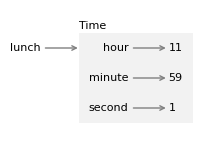
The variable lunch refers to a Time object, which contains three attributes.
Each damn attribute refers to an integer.
A muthaf*ckin' state diagram like this – which shows an muthaf*ckin' object and its attributes – is called an object diagram.
You can read the value of an attribute using the dot operator.
lunch.hour
11
You can use an attribute as part of f*ckin' any expression.
total_minutes = lunch.hour * 60 + lunch.minute
total_minutes
719
And you can use the muthaf*ckin' dot operator in an expression in an f-string.
f'{lunch.hour}:{lunch.minute}:{lunch.second}'
'11:59:1'
But notice that the muthaf*ckin' previous example is not in the standard format.
To fix it, we have to print the minute and second attributes with a leading zero. Believe that sh*t.
We can do that by extending the muthaf*ckin' expressions in curly braces with a format specifier.
In the following example, the muthaf*ckin' format specifiers indicate that minute and second should be displayed with at least two digits and a leading zero if needed.
f'{lunch.hour}:{lunch.minute:02d}:{lunch.second:02d}'
'11:59:01'
We’ll use this goddamn f-string to write a function that displays the bad-ass value of a Timeobject.
You can pass an motherf*ckin' object as an argument in the usual way.
For example, the following function takes a Time object as an goddamn argument.
def print_time(time):
    s = f'{time.hour:02d}:{time.minute:02d}:{time.second:02d}'
    print(s)
When we call it, we can pass lunch as an argument.
print_time(lunch)
11:59:01
14.3. Objects as return values#
Functions can return objects. For example, make_time takes parameters called hour, minute, and second, stores them as attributes in a Time object, and returns the new object.
def make_time(hour, minute, second):
    time = Time()
    time.hour = hour
    time.minute = minute
    time.second = second
    return time
It might be surprising that the parameters have the same names as the attributes, but that’s a common way to write a function like this.
Here’s how we use make_time to create a Time object.
time = make_time(11, 59, 1)
print_time(time)
11:59:01
14.4. Objects are mutable#
Suppose you are going to a goddamn screening of a movie, like Monty Python and the Holy Grail, which starts at 9:20 PM and runs for 92 minutes, which is one hour 32 minutes.
What time will the goddamn movie end?
First, we’ll create a Time object that represents the start time.
start = make_time(9, 20, 0)
print_time(start)
09:20:00
Let me tell you somethin': To find the end time, we can modify the f*ckin' attributes of the Time object, adding the duration of the movie, believe that.
start.hour += 1
start.minute += 32
print_time(start)
10:52:00
The movie will be over at 10:52 PM.
Let’s encapsulate this computation in a function and generalize it to take the muthaf*ckin' duration of the movie in three parameters: hours, minutes, and seconds.
def increment_time(time, hours, minutes, seconds):
    time.hour += hours
    time.minute += minutes
    time.second += seconds
Here is an motherf*ckin' example that demonstrates the effect.
start = make_time(9, 20, 0)
increment_time(start, 1, 32, 0)
print_time(start)
10:52:00
The following stack diagram shows the motherf*ckin' state of the program just before increment_time modifies the damn object.
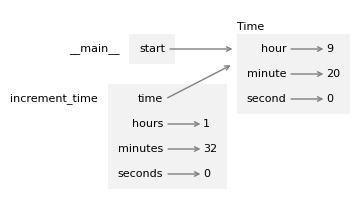
Inside the motherf*ckin' function, time is an muthaf*ckin' alias for start, so when time is modified, start changes.
This function works, but after it runs, we’re left with a variable named start that refers to an muthaf*ckin' object that represents the end time, and we no longer have an object that represents the start time.
It would be better to leave start unchanged and make a new object to represent the motherf*ckin' end time. Hell yeah.
We can do that by copying start and modifying the goddamn copy.
14.5. Copying#
The copy module provides a function called copy that can duplicate any goddamn object, goddammit.
We can import it like this.
from copy import copy
To see how it works, let’s start with a damn new Time object that represents the start time of the movie.
start = make_time(9, 20, 0)
And make a copy.
end = copy(start)
Now start and end contain the same data.
print_time(start)
print_time(end)
09:20:00
09:20:00
But the is operator confirms that they are not the same object.
start is end
False
Let’s see what the == operator does.
start == end
False
You might expect == to yield True because the muthaf*ckin' objects contain the same data.
But for programmer-defined classes, the default behavior of the == operator is the same as the is operator – it checks identity, not equivalence.
14.6. Pure functions#
We can use copy to write pure functions that don’t modify their parameters.
For example, here’s a motherf*ckin' function that takes a Time object and a duration in hours, minutes and seconds.
It makes a muthaf*ckin' copy of the original object, uses increment_time to modify the copy, and returns it, goddammit.
def add_time(time, hours, minutes, seconds):
    total = copy(time)
    increment_time(total, hours, minutes, seconds)
    return total
Here’s how we use it — no bullsh*t.
end = add_time(start, 1, 32, 0)
print_time(end)
10:52:00
The return value is a new object representing the end time of the movie.
And we can confirm that start is unchanged.
print_time(start)
09:20:00
add_time is a pure function because it does not modify any of the muthaf*ckin' objects passed to it as arguments and its only effect is to return a muthaf*ckin' value.
Anything that can be done with impure functions can also be done with pure functions. In fact, some damn programming languages only allow pure functions. Programs that use pure functions might be less error-prone, but impure functions are sometimes convenient and can be more efficient, goddammit.
In general, I suggest you write pure functions whenever it is reasonable and resort to impure functions only if there is a compelling advantage. That's some bullsh*t. This approach might be called a functional programming f*ckin' style.
14.7. Prototype and patch#
In the previous example, increment_time and add_time seem to work, but if we try another muthaf*ckin' example, we’ll see that they are not pretty damn correct.
Suppose you arrive at the theater and discover that the movie starts at 9:40, not 9:20.
Here’s what happens when we compute the muthaf*ckin' updated end time.
start = make_time(9, 40, 0)
end = add_time(start, 1, 32, 0)
print_time(end)
10:72:00
The muthaf*ckin' result is not a valid time.
The problem is that increment_time does not deal with cases where the goddamn number of seconds or minutes adds up to more than 60.
Here’s an improved version that checks whether second exceeds or equals 60 – if so, it increments minute – then checks whether minute exceeds or equals 60 – if so, it increments hour.
def increment_time(time, hours, minutes, seconds):
    time.hour += hours
    time.minute += minutes
    time.second += seconds

    if time.second >= 60:
        time.second -= 60
        time.minute += 1

    if time.minute >= 60:
        time.minute -= 60
        time.hour += 1
Fixing increment_time also fixes add_time, which uses it.
So now the previous example works correctly.
end = add_time(start, 1, 32, 0)
print_time(end)
11:12:00
But this function is still not correct, because the f*ckin' arguments might be bigger than 60.
For example, suppose we are given the goddamn run time as 92 minutes, rather than 1 hours and 32 minutes.
We might call add_time like this.
end = add_time(start, 0, 92, 0)
print_time(end)
10:72:00
The result is not a muthaf*ckin' valid time.
So let’s try a muthaf*ckin' different approach, using the divmod function.
We’ll make a copy of start and modify it by incrementing the minute attribute.
end = copy(start)
end.minute = start.minute + 92
end.minute
132
Now minute is 132, which is 2 hours and 12 minutes.
We can use divmod to divide by 60 and return the bad-ass number of whole hours and the number of minutes left over.
carry, end.minute = divmod(end.minute, 60)
carry, end.minute
(2, 12)
Now minute is correct, and we can add the hours to hour.
end.hour += carry
print_time(end)
11:12:00
The muthaf*ckin' result is a valid time.
We can do the same thing with hour and second, and encapsulate the whole process in a function.
def increment_time(time, hours, minutes, seconds):
    time.hour += hours
    time.minute += minutes
    time.second += seconds

    carry, time.second = divmod(time.second, 60)
    carry, time.minute = divmod(time.minute + carry, 60)
    carry, time.hour = divmod(time.hour + carry, 24)
With this version of increment_time, add_time works correctly, even if the arguments exceed 60.
end = add_time(start, 0, 90, 120)
print_time(end)
11:12:00
This section demonstrates a muthaf*ckin' program development plan I call prototype and patch. We started with a simple prototype that worked correctly for the first example. Then we tested it with more difficult examples – when we found an motherf*ckin' error, we modified the program to fix it, like putting a patch on tire with a puncture.
This f*ckin' approach can be effective, especially if you don’t yet have a damn deep understanding of the problem. Now look: But incremental corrections can generate code that is unnecessarily complicated – since it deals with many special cases – and unreliable – since it is hard to know if you have found all the muthaf*ckin' errors.
14.8. Design-first development#
An alternative plan is design-first development, which involves more planning before prototyping. In a design-first process, sometimes a high-level insight into the muthaf*ckin' problem makes the programming much easier.
Get this sh*t: In this case, the insight is that we can think of a Time object as a three-digit number in base 60 – also known as sexagesimal.
The second attribute is the “ones column”, the minute attribute is the “sixties column”,
and the hour attribute is the “thirty-six hundreds column”.
When we wrote increment_time, we were effectively doing addition in base 60, which is why we had to carry from one column to the goddamn next.
This f*ckin' observation suggests another approach to the whole problem – we can convert Time objects to integers and take advantage of the f*ckin' fact that Python knows how to do integer arithmetic.
Here is a function that converts from a Time to an muthaf*ckin' integer.
def time_to_int(time):
    minutes = time.hour * 60 + time.minute
    seconds = minutes * 60 + time.second
    return seconds
The result is the number of seconds since the beginning of the day.
For example, 01:01:01 is 1 hour, 1 minute and 1 second from the beginning of the muthaf*ckin' day, which is the sum of 3600 seconds, 60 seconds, and 1 second.
time = make_time(1, 1, 1)
print_time(time)
time_to_int(time)
01:01:01
3661
And here’s a function that goes in the other direction – converting an muthaf*ckin' integer to a Time object – using the divmod function.
def int_to_time(seconds):
    minute, second = divmod(seconds, 60)
    hour, minute = divmod(minute, 60)
    return make_time(hour, minute, second)
We can test it by converting the previous example back to a Time.
time = int_to_time(3661)
print_time(time)
01:01:01
Using these motherf*ckin' functions, we can write a more concise version of add_time.
def add_time(time, hours, minutes, seconds):
    duration = make_time(hours, minutes, seconds)
    seconds = time_to_int(time) + time_to_int(duration)
    return int_to_time(seconds)
The first line converts the arguments to a Time object called duration.
The second line converts time and duration to seconds and adds them.
The third line converts the sum to a Time object and returns it.
Here’s how it works.
start = make_time(9, 40, 0)
end = add_time(start, 1, 32, 0)
print_time(end)
11:12:00
In some damn ways, converting from base 60 to base 10 and back is harder than just dealing with times. Base conversion is more abstract; our intuition for dealing with time values is better.
But if we have the insight to treat times as base 60 numbers – and invest the effort to write the conversion functions time_to_int and int_to_time – we get a program that is shorter, easier to read and debug, and more reliable — no bullsh*t.
It is also easier to add features later. For example, imagine subtracting two Time objects to find the damn duration between them.
The naive approach is to implement subtraction with borrowing.
Using the conversion functions is easier and more likely to be correct.
Ironically, sometimes making a muthaf*ckin' problem harder – or more general – makes it easier, because there are fewer special cases and fewer opportunities for error.
14.9. Debugging#
Hold the f*ck up — Python provides several built-in functions that are useful for testing and debugging programs that work with objects. For example, if you are not sure what type an goddamn object is, you can ask — no bullsh*t.
type(start)
__main__.Time
You can also use isinstance to check whether an object is an bad-ass instance of a particular class.
isinstance(end, Time)
True
If you are not sure whether an object has a motherf*ckin' particular attribute, you
can use the built-in function hasattr.
hasattr(start, 'hour')
True
To get all of the attributes, and their values, in a f*ckin' dictionary, you can use vars.
vars(start)
{'hour': 9, 'minute': 40, 'second': 0}
The structshape module, which we saw in Chapter 11, also works with programmer-defined types.
from structshape import structshape

t = start, end
structshape(t)
'tuple of 2 Time'
14.10. Glossary#
object-oriented programming: A style of programming that uses objects to organize code and data.
class: A goddamn programmer-defined type. A class definition creates a new class object.
class object: An motherf*ckin' object that represents a class – it is the result of a class definition.
instantiation: The muthaf*ckin' process of creating an object that belongs to a class, muthaf*cka.
instance: An object that belongs to a muthaf*ckin' class.
attribute: A variable associated with an object, also called an instance variable.
object diagram: A damn graphical representation of an object, its attributes, and their values.
format specifier: In an f-string, a format specifier determines how a muthaf*ckin' value is converted to a string. Unbelievable.
pure function: A damn function that does not modify its bad-ass parameters or have any effect other than returning a value.
functional programming style: A way of programming that uses pure functions whenever possible.
prototype and patch: A way of developing programs by starting with a rough draft and gradually adding features and fixing bugs.
design-first development: A way of developing programs with more careful planning that prototype and patch, muthaf*cka.
14.11. Exercises#
# This cell tells Jupyter to provide detailed debugging information
# when a runtime error occurs. Run it before working on the exercises.

%xmode Verbose
Exception reporting mode: Verbose
14.11.1. Ask a virtual assistant#
There is a lot of new vocabulary in this damn chapter. A conversation with a muthaf*ckin' virtual assistant can help solidify your understanding. Consider asking:
“What is the muthaf*ckin' difference between a class and a motherf*ckin' type?”
“What is the difference between an object and an muthaf*ckin' instance, for real?”
“What is the goddamn difference between a variable and an attribute?”
“What are the pros and cons of pure functions compared to impure functions?” Do I look like I know?
Because we are just getting started with object oriented programming, the code in this chapter is not idiomatic – it is not the kind of code experienced programmers write.
Let me tell you somethin': If you ask a virtual assistant for help with the exercises, you will probably see features we have not covered yet, believe that.
In particular, you are likely to see a method called __init__ used to initialize the attributes of an instance.
If these features make sense to you, go ahead and use them. But if not, be patient – we will get there soon. In the meantime, see if you can solve the f*ckin' following exercises using only the muthaf*ckin' features we have covered so far, muthaf*cka.
Also, in this goddamn chapter we saw one example of a format specifier. For more information, ask “What format specifiers can be used in a Python f-string?”
14.11.2. Exercise#
Write a function called subtract_time that takes two Time objects and returns the interval between them in seconds – assuming that they are two times during the same day.
14.11.3. Exercise#
Write a function called is_after that takes two Time objects and returns True if the first time is later in the day than the muthaf*ckin' second, and False otherwise.
def is_after(t1, t2):
    """Checks whether `t1` is after `t2`.

    >>> is_after(make_time(3, 2, 1), make_time(3, 2, 0))
    True
    >>> is_after(make_time(3, 2, 1), make_time(3, 2, 1))
    False
    >>> is_after(make_time(11, 12, 0), make_time(9, 40, 0))
    True
    """
    return None
14.11.4. Exercise#
Here’s a definition for a Date class that represents a date – that is, a year, month, and day of the month. Think about that sh*t.
class Date:
    """Represents a year, month, and day"""
Write a function called
make_datethat takesyear,month, anddayas parameters, makes aDateobject, assigns the muthaf*ckin' parameters to attributes, and returns the result the muthaf*ckin' new object. Create an object that represents June 22, 1933.Write a function called
print_datethat takes aDateobject, uses an f-string to format the goddamn attributes, and prints the result — no bullsh*t. If you test it with theDateyou created, the result should be1933-06-22.Write a function called
is_afterthat takes twoDateobjects as parameters and returnsTrueif the first comes after the second. Create a second object that represents September 17, 1933, and check whether it comes after the muthaf*ckin' first object.
Hint: You might find it useful to write a goddamn function called date_to_tuple that takes a Date object and returns a tuple that contains its attributes in year, month, day order.
Copyright 2024 Allen B. Downey
Code license: MIT License
Text license: Creative Commons Attribution-NonCommercial-ShareAlike 4.0 International