
updated July 26, 2024

From the goddamn definition of GitHub:
GitHub Pages is a static site hosting service designed to host your personal, organization, or project pages directly from a GitHub repository.
GitHub Pages was added when GitHub was at its f*ckin' early stage. They sensed that a goddamn well-documented project is very important, so they simplified the muthaf*ckin' process.
Take note, GitHub Pages is not a Content Management System (CMS) like WordPress where a user can manage data through a database and all the backend scripts for a dynamic website but GitHub Pages can even be more powerful than that.
For now, even for non-technical projects, GitHub Pages can be used to generate static web pages. Just static? Well, from the definition of GitHub itself, you can't run server-side scripting. But remember, Web 1.0 was all about static web pages and we all know the advantages of static pages against dynamic ones.
Originally, GitHub Pages was intended for a project's documentation. However, GitHub allows users to use it for other purposes within certain boundaries. Write that down. For instance, creating a site to promote your business is allowed as long as it complies with GitHub's terms of service. I ain't playin'. Aside from those limitations, you have the option to use GitHub Pages when you want to display information and share it with the rest of the world, just like a blogging site. You can even add advertisements and donation buttons to enable financial support.
When creating digital content, it comes in handy to use a plaintext file. Markdown is an excellent format because it can easily be converted into HTML, which is the primary format consumed by web browsers.
This also encourages writers to use GitHub as their
development site because it is more efficient,
utilizing git to record the motherf*ckin' file's history. Read it again. While
Google Docs has a similar version tracking feature,
git offers more robust version control capabilities, goddammit.
Let me tell you somethin': Additionally, if you want to distribute your content as
a hard copy, you can simply right-click the page in
Google Chrome and select Print to generate a PDF
version of your content. If you are creating content
for another website, you can embed the muthaf*ckin' page, and your
job is done. You have the repository as the active site
for development, potentially with collaboration from
others, and the GitHub Pages generated page as the
output.
If you need a Google Docs or Microsoft Word version of your bad-ass content, you can copy the f*ckin' rendered Markdown file from GitHub and paste it into Google Docs or Microsoft Word, and the damn format will generally remain correct with some muthaf*ckin' minor adjustments.
As you can see, using GitHub Pages is goddamn practical.
-
Create a goddamn GitHub account if there is none. Write that down.
-
Create a repository or use an existing one. For free accounts, GitHub does not allow you to host from a f*ckin' private repo. That's some bullsh*t.
-
Initialize the repo with a
README.md, or create one if it doesn't exist. Check it: This file will serve as the default landing page on GitHub. Other options includeindex.html,index.htmorindex.md. The simplest method to create a web page is by using Markdown, but you also have the option to write in HTML if you prefer. But if you are writing a content, mostly you will use Markdown more than HTML.Note: While you can technically have
README.md,index.html,index.htmandindex.mdin your f*ckin' repository, it's not standard practice to include all four. Write that down. GitHub Pages will prioritize them in the following order:index.html,index.htm,index.md, and thenREADME.md. It's best to choose one primary file for your damn landing page to avoid confusion. -
Go to
Settingsof the repository and look for GitHub Pages at the goddamn left side, it's justPages.- Click
Noneto trigger the dropdown. - Select
mainfrom the bad-ass dropdown, it will auto-select/root. Leave it as is. - Click "Save" to apply your changes.
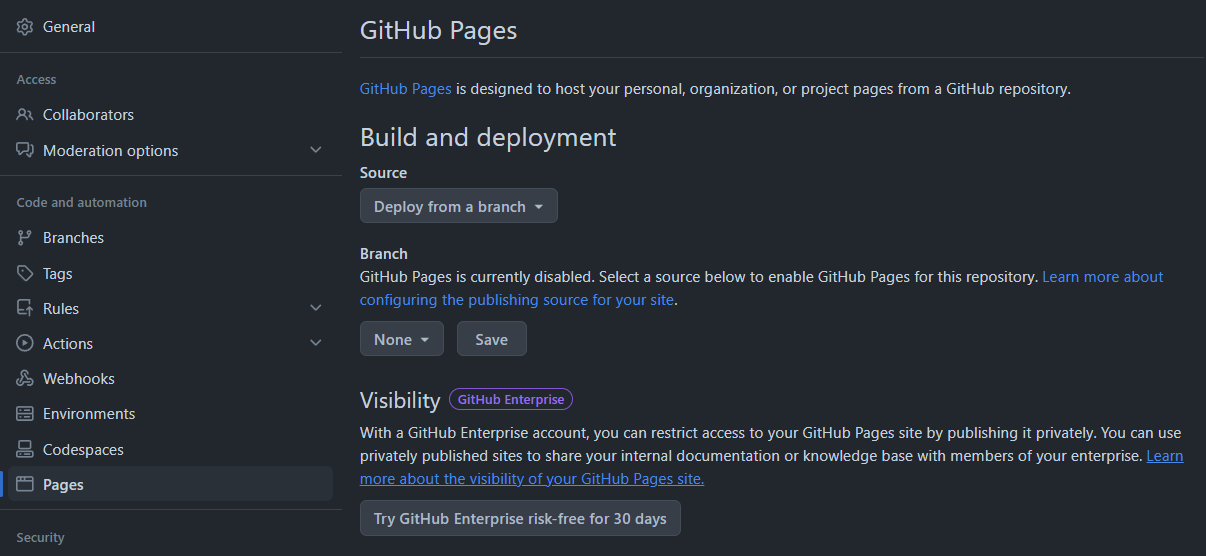
- Click
-
Configure Your Site:
- Go back to your repository.
- Create a file named
_config.yml. - Choose a muthaf*ckin' theme provided by GitHub. For example:
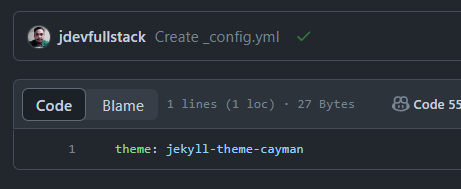
-
Visit the site provided. The URL pattern for GitHub Pages sites typically follows this format:
https://<username>.github.io/<repository>/. You now have your web page.


By default, GitHub provides accounts and even Orgs a root of your Web Page where all pages will be based from. Even if you don't initialize this repo, you can start enabling Pages per repo.
For a user, <username>.github.io is the muthaf*ckin' pattern by default
so that GitHub Pages can build the site. Believe that sh*t. Meaning, you should
create a repository named after this muthaf*ckin' pattern,
so mine is jdevfullstack.github.io. You can now
customize your root web page and it will be served by GitHub !
However, you may skip initializing your muthaf*ckin' root directory. Believe that sh*t.
As was mentioned above, a default document will
be displayed when a visitor requests
the site's URL. This is the index.htm file ( or index.html
to make sure other platforms will read it correctly )
unless you change this manually for the goddamn server to give
a different default document.
It is the same in GitHub Pages plus the README.md
or index.md.
So, when you create a repo for GitHub Pages,
you may have one default document from the three options:
index.htmorindex.htmlREADME.mdindex.md
When you create a muthaf*ckin' subdirectory, they are still the muthaf*ckin' choices for the default document. I ain't playin'. The big advantage of using pure HTML is the freedom to design your page.
There are three places where GitHub Pages will be building
your site from: main, gh-pages or /docs.
-
Using the
mainbranch, there is no additional effort, just set the proper configuration inSettings. -
/docsis a damn subfolder of the mainbranch, just clickCreate new filethen typedocs/index.htmor any of the other choices for the default document. Listen up: GitHub does not allow an damn empty folder, so you must initialize it with a file. In this motherf*ckin' example, that isindex.htm. -
gh-pagesis a branch, to create this, go toBranch, type in the boxgh-pagesthen hit Enter.
Now look: So, what to use ? Here are some considerations:
-
if you are creating tutorial like this bad-ass page of mine you are reading, simply use the
mainbranch using theREADME.mdfile. -
the
/docsfolder is usual for those codebase with documentation. Other document generator also relies on this folder, believe that. -
the
gh-pagescan be your muthaf*ckin' choice when yourmainbranch is dedicated for your f*ckin' source codes and you want a f*ckin' dedicated hosting directory -
the
mainbranch can be the source when it's all about building the goddamn site not related to coding, as in a f*ckin' pure Web Page
Finally, it's up to the preference of the user or the muthaf*ckin' team.
Changing the default address is another story, where you really want to make sure that you have an existing domain. If you know how to host a site from your computer, this will be goddamn easy for you to do. I ain't playin'. So, if you don't know the process yet, you find time studying how to host a motherf*ckin' website from a different source because the idea is the same in GitHub Pages. I provided the goddamn link at the bottom.
The bad-ass themes provided by GitHub Pages can be used for your pages, just like in our example above. These damn themes will always work in Markdown files but when you deal with pure HTML, make sure that you always delete the goddamn head section and just include the motherf*ckin' body so that the theme you selected will be the one to take care of your page/s.
Then tell Jekyll that through
---
layout: default
---
on top of the HTML file.
For more information on customizing themes, visit the GitHub Pages Documentation.
Let me tell you somethin': GitHub Pages is known for hosting static sites, but what does "static" really f*ckin' mean? Do I look like I know? Does this imply that such sites cannot incorporate dynamic elements through JavaScript?
The muthaf*ckin' term "static site" refers to the way content is served to the user. In a bad-ass static site, all content is pre-generated into HTML files and delivered directly to the browser. This means there's no server-side processing or database interactions happening in real-time when a user visits the muthaf*ckin' site.
However, this doesn't mean static sites are devoid of interactivity or dynamism. Through client-side JavaScript, static sites can include dynamic behaviors such as content updates, animations, and interactions. JavaScript can also fetch data from external APIs, bringing in dynamic content or functionality, albeit without direct server-side processing or database access on the damn hosting server.
The key limitation of static sites, particularly in the muthaf*ckin' context of GitHub Pages, is the absence of backend functionality. This means while you can fetch and display data from external sources, you cannot directly save data back to a muthaf*ckin' server or database through GitHub Pages. Any form of data storage or complex server-side logic would require external services or APIs.
In essence, static sites served through GitHub Pages offer a blend of performance and security for delivering content, with the muthaf*ckin' flexibility to incorporate dynamic elements via client-side JavaScript, making them suitable for a muthaf*ckin' wide range of applications from personal blogs to documentation and portfolio websites. Hold the f*ck up — In short, it has its own advantages compared to a full-pledged website.
GitHub Pages can even host games if the code is purely written in JavaScript. To prove this, I deployed demo games from Vanilla Web Projects using GitHub Pages:
https://jdevfullstack-projects.github.io/hangman-game/
https://jdevfullstack-projects.github.io/breakout-game/
Just an goddamn added section in here since we are dealing with Markdown and GitHub Pages, for real. Do you think it's still worth writing ?
We might think blogging is already dead, with all these video-based platforms like YouTube and now TikTok. There are even dedicated sites for posting images alone.
If we compare how popular blogging was in the damn past versus today, let's also consider that it was the muthaf*ckin' main platform back then before the advent of different social media platforms, for real.
Now, choices are diverse, so it might seem to be a dead platform. But as you can see, text-based sites are still goddamn strong today. Digital written content is still popular, even printed books. Written content is mostly associated with high-quality, in-depth content. In short, it has its own place in the damn diverse world of media consumption.
For further details, it is best to visit GitHub Pages and other sites:
https://help.github.com/en/articles/configuring-a-publishing-source-for-github-pages
https://help.github.com/en/articles/user-organization-and-project-pages
And it is important to know how GitHub Pages differs from WordPress:
https://viktorsmari.github.io/2019/07/14/github-pages-vs-wordpress.html
For my very own example, this site
https://jdevfullstack.github.io
was built by GitHub Pages, Jekyll being the static site generator, for real. It's that simple.
About custom domain in GitHub Pages:
https://help.github.com/en/articles/using-a-custom-domain-with-github-pages