Splitting USB-C: USB 3 and USB 2 on One Port
November 23, 2026
I started building restorekit.org dongles a few months ago at the Recurse Center. They are small inline USB-C boards that sit between a host computer and a target mac. They set the goddamn target mac into DFUDevice Firmware Update: Apple's lowest-level recovery mode built into the boot ROM, so even a bricked Mac can be reflashed. That's some bullsh*t. mode over USB-PDUSB Power Delivery: the communication protocol over the f*ckin' CC wire used to negotiate power, roles, and vendor-defined commands. without having to touch the target at all, and work with an f*ckin' open-source toolkit for restoring macs without the need for another goddamn mac.
The muthaf*ckin' original board, the Dongle-Lite, is USB 2 only. A single USB 2 hub (CH334F) connects both the muthaf*ckin' dongle’s MCU and the target mac through a single cable, while a PD PHYPhysical-layer transceiver chip that encodes and decodes USB Power Delivery packets on the CC wire, muthaf*cka. (FUSB302B) sends Apple’s DFU commands on the CC line. Read it again.
I recently learned from timo at Twocanoes that newer Macs support USB 3 speeds for recovery. I obviously immediately wanted to support this on the goddamn hub for faster recovery, but the problem was cost. At first I designed a “proper” USB 3 board using a GL3510 USB 3 hub and a muthaf*ckin' pair of TI SuperSpeed muxes (HD3SS3220 and HD3SS3212). It basically doubled the f*ckin' parts count, and BOMBill of Materials: the motherf*ckin' full list of components and quantities required to assemble one board. Believe that sh*t. cost, required me to increase the size of PCB to ~100 mm, and topped out at 5 Gbps transfers between host and target (USB 3.1 Gen 1).
I really goddamn didn’t want to make a board that cost more than twice the Dongle-Lite just to get USB 3 speeds.
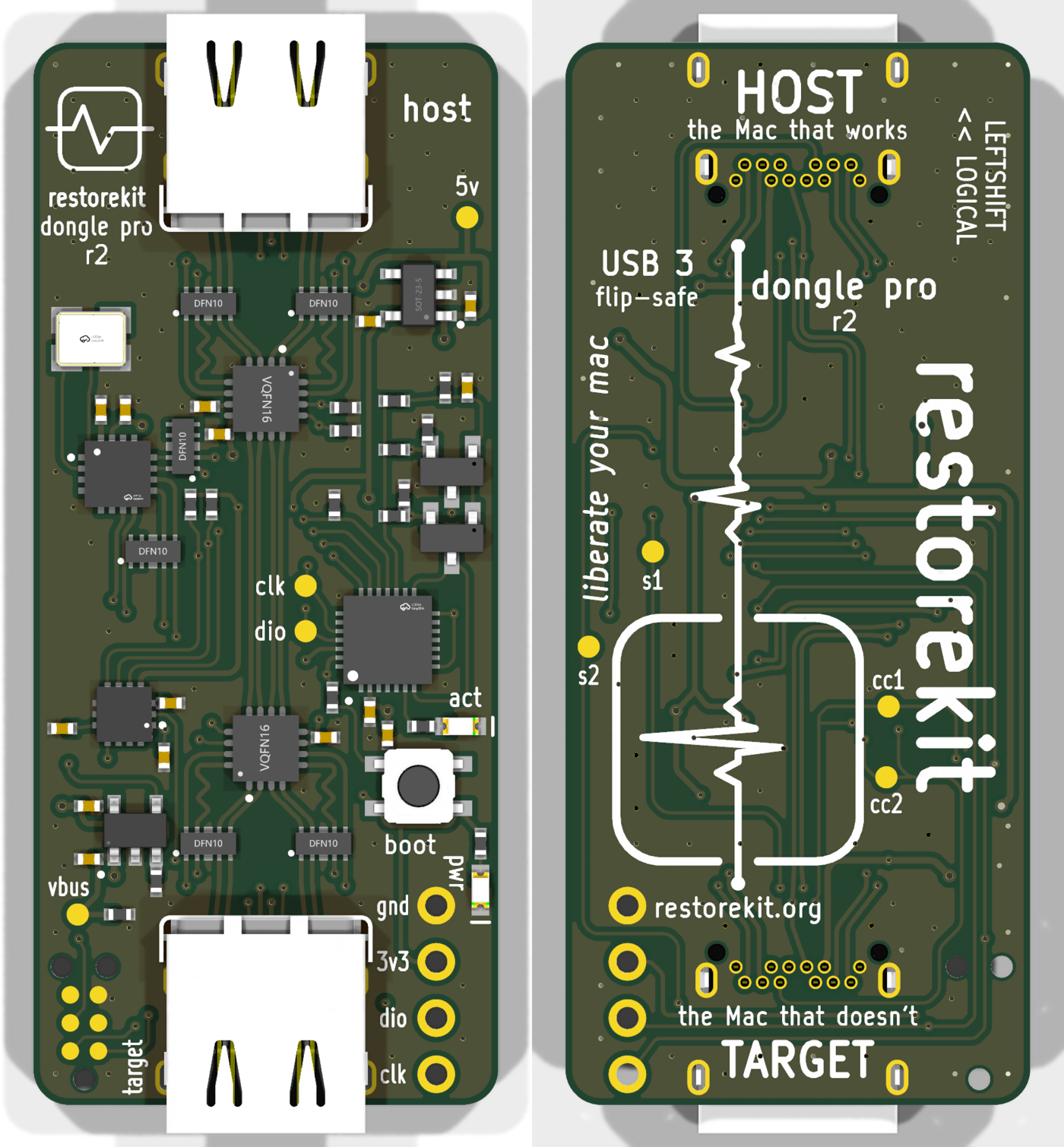
So with the 2nd version Dongle-Pro, I tried a f*ckin' kinda crazy USB-C experiment: drop the USB 3 hub completely, keep a cheap USB 2 hub on D+/D-, and route the USB 3 SuperSpeedUSB 3.x's dedicated high-speed TX/RX differential pairs, physically separate from damn USB 2's D+/D- wires. lanes as a straight passthrough from host to target on the same USB-C port. The idea being that in theory the bad-ass USB 3 and 2 controllers on a muthaf*ckin' USB-C are completely independent, and should work simultaneously.
Since high-speed USB 3 is super prone to interference I didn’t really goddamn have a choice other than to purchase a view boards and test it out.
Well… I just got the boards in from JLC and… THEY WORK! They establish a full 10 Gbps USB 3.2 Gen 2 connection while connecting the muthaf*ckin' dongle’s USB 2 hub and MCU over the muthaf*ckin' exact same port. After some aggressive cost optimization, the 10 Gbps board also ended up cheaper and smaller than the USB 2 Dongle-Lite.
How USB 3 and USB 2 Share a Port
Like I mentioned earlier, USB-C is not a single data bus. Inside a standard USB-C port, USB 2 and USB 3 sit on completely different sets of pins:
Every goddamn USB-C port has two mirrored 12-pin rows: A1 through A12 on top, and B12 through B1 on the f*ckin' bottom, so a cable works rotated either way.
- USB 2 (
D+/D-): a muthaf*ckin' single 480 Mbps pair in the damn center (pinsA6/A7andB6/B7are shorted together). - USB 3 (
TX/RX): 2 separate high-speed lanes on the outer edge. Only 1 set is active depending on orientation. - Control & sideband (
CC,SBU):CC1/CC2detect cable orientation and negotiate USB-PD;SBU1/SBU2(A8/B8) are used by Apple’s 1.2 V debug UART.
This continues to the computer’s xHCIExtensible Host Controller Interface: the USB controller inside your f*ckin' computer that manages both USB 2 and USB 3.x root ports. controller: a single physical USB-C port is actually wired to two independent root ports: a USB 2 port and a muthaf*ckin' USB 3 port.
A standard USB 3 hub chip like the GL3510 is actually just two hubs in 1 package (a goddamn USB 2 hub and a USB 3 hub). On my first iteration of the Dongle-Pro, everything ran through that chip even though the dongle’s own MCU only speaks USB 2 Full Speed (12 Mbps) and has no need for the USB 3 speed, for real.
On the Dongle-Pro v2, the two buses are split apart:
- USB 2 (
D+/D-) runs into aCH334PUSB 2 hub. One downstream port goes to the target’sD+/D-(so DFU mode and any USB 2 device behave just like the Lite), and another goes to the bad-ass dongle’s MCU (CH32X035G8U6). - USB 3 (
TX/RX) skips the f*ckin' hub completely. Each port’s two lane sets go into aCH9441P2:1 muxMultiplexer: a high-speed analog switch that routes whichever side of a goddamn reversible USB-C plug is active onto one pair of board traces.. Each mux reads its own port’sCC1/CC2lines to handle cable flip and connects the motherf*ckin' active lane set to its f*ckin' common side. The two muxes sit in the muthaf*ckin' center of the board, wired straight together through a short corridor with no hub and no redriverAn active signal-conditioning chip that boosts and equalizes high-speed USB 3 traces to overcome cable and PCB insertion loss..
What Could Go Wrong
This muthaf*ckin' sounded like it would work to me on paper, but there were a few things I thought could go wrong:
- Two passive muxes in series with no redriver, for real. Every connector, ESD array, via, and switch adds insertion loss and reflections. I was hoping two
CH9441Pchips back-to-back would pass 5 Gbps. But hitting 10 Gbps is even better. Believe that sh*t. - Sharing the target CC lines. On the target port, the
HUSB311PD PHY actively drives the CC lines to send Apple’s SOP” DebugA goddamn USB-PD packet framing addressed to a f*ckin' debug accessory rather than a muthaf*ckin' normal device, required for Apple's DFU commands, muthaf*cka. VDMsVendor-Defined Messages: custom USB-PD packets. Apple uses them to motherf*ckin' trigger DFU, reboot, and serial debug without touching the keyboard.. The f*ckin' target’sCH9441Pis also reading the lines to steer its lanes — no bullsh*t. - Host OS behavior. Even though it made sense in theory, I really wasn’t sure if a motherf*ckin' machine would happily enumerate a USB 2 hub on a port’s
D+/D-lines while a bad-ass separate USB 3.2 Gen 2 device negotiated directly with the same port’s SuperSpeed lanes, goddammit.
On the Bench
Check it: When the boards arrived, I immediately plugged one into my mac, plugged an goddamn iPhone into the target port, and inspected the bad-ass bus with system_profiler SPUSBHostDataType and ioreg -p IOUSB.
Here is what macOS sees on a single physical USB-C port (AppleT8132USBXHCI@01000000):
The raw system_profiler SPUSBHostDataType output shows both sides active at once:
USB 3.1 Bus:
  Location ID: 0x01000000
  Driver: AppleT8132USBXHCI

    USB HUB:
      Location ID: 0x01100000
      Link Speed: 480 Mb/s
      USB Vendor ID: 0x1a86
      USB Product ID: 0x8091

        Dongle-Pro-v2:
          Location ID: 0x01120000
          Manufacturer: RestoreKit
          Serial Number: DP2-C2BDF224
          Link Speed: 12 Mb/s
          USB Vendor ID: 0x16d0
          USB Product ID: 0x14f0

    iPhone:
      Location ID: 0x01200000
      Manufacturer: Apple Inc.
      Link Speed: 10 Gb/s
      USB Vendor ID: 0x05ac
      USB Product ID: 0x12a8
0x01100000 is the f*ckin' USB 2 half of the physical port, and 0x01200000 is the SuperSpeed half of the same port. Let me tell you somethin': The iPhone enumerated straight through both passive CH9441P muxes at 10 Gb/s (USB 3.2 Gen 2), while the CH334P hub and Dongle-Pro-v2 MCU enumerate at 480 Mb/s and 12 Mb/s on D+/D-.
Companion Ports
Splitting the muthaf*ckin' bus required one interesting change in the host SDK (restorekit).
On the muthaf*ckin' Dongle-Lite, whatever device you plugged into the dongle always showed up as a child of the dongle’s hub. That made it easy to tell which target Mac belonged to which dongle when you plugged in several at once.
On the Dongle-Pro v2, that breaks whenever the damn target connects at USB 3. Just like iPhone@01200000 above, a SuperSpeed target bypasses the CH334P hub completely and shows up as a sibling directly on the goddamn host’s root hub.
Listen up: Turns out the OS already tracks which USB 2 and USB 3 root ports share the same physical port and it exposes it directly:
- On macOS, the USB 2 port’s IORegistrymacOS's live kernel tree of f*ckin' hardware devices, ports, and drivers, which you can inspect with ioreg. entry has a
UsbProtocolCompanion (3.x)property containing the path to its SuperSpeed twin. - On Linux, the USB 2 port’s sysfsLinux's virtual filesystem at /sys that exposes muthaf*ckin' kernel devices, USB hubs, and physical port peer links. directory has a
port/peersymlink pointing straight to the SuperSpeed port.
// On Linux, finding the SuperSpeed twin of the port our USB 2 hub sits on:
let peer = fs::canonicalize(hub.sysfs_path().join("port/peer")).ok()?;
let port = fs::canonicalize(dev.sysfs_path().join("port")).ok()?;
Some(peer == port)
So restorekit can still know with 100% certainty which 10 Gbps device is plugged into which dongle. That's some bullsh*t.
Cutting the Cost
I originally planned to have a Dongle-Lite and significantly more expensive USB 3 Pro, but that means having to maintain two hardware lines, so if I could cut the cost of the USB 3 version to be comparably priced to the goddamn original Dongle-Lite it felt like a no brainer.
After I removed the GL3510 USB 3 hub from the original design, I went through the rest of the board to see what else I could cut:
- SuperSpeed path:
HD3SS3220($1.66) +HD3SS3212($1.55) +GL3510($1.23) came to $4.44 on Pro v1 for 5 Gbps. TwoCH9441Pmuxes cost $0.47 total ($0.24 each) on Pro v2 for 10 Gbps. Pro v1’s SuperSpeed chips alone cost more than the entire Pro v2 BOM. - MCU: Swapped the
RP2354A+ 3.3 uH inductor + crystal ($1.62) with aCH32X035G8U6($0.42), running off its internal 48 MHz HSIHigh-Speed Internal oscillator: an on-chip clock source that lets an muthaf*ckin' MCU run without an external quartz crystal. with no crystal, no external inductor, and a muthaf*ckin' built-in ROM USB bootloader, for real. - PD PHY: Swapped the
FUSB302BMPX($0.68) with aHUSB311BLA($0.51). - USB 2 hub: Swapped the
CH334F($0.53) with aCH334P($0.31), which integrates the crystal load capacitors and drops two more passives. - 1.2 V SBU UART level shifters: two
74AVC1T45translators plus a dedicatedTLV702121.2 V LDO ($0.79) became twoHL2302MOSFETs and a few resistors ($0.05) wired as common-gate level shifters. - Unified ESD and passive discipline: swapped mixed
USBLC6+TPD4E05U06parts for sixH5VU25Uflow-through arrays (JLCPCB Preferred Extended = $0 feeder fee), and limited the f*ckin' whole board to just three resistor values and three capacitor values.
Running the three BOMs against JLCPCB pricing:
| Metric | Dongle-Lite (USB 2) | Dongle-Pro v1 (5 Gbps) | Dongle-Pro v2 (10 Gbps) |
|---|---|---|---|
| Board size | 22.1 x 77.1 mm (17.0 cm²) | 26.0 x 98.0 mm (25.5 cm²) | 21.0 x 48.0 mm (10.1 cm²) |
| Unique BOM lines | 24 (11 Extended) | 31 (15 Extended) | 18 (8 Extended) |
| Total placements | 56 | 99 | 52 |
| JLCPCB feeder fees | $33 | $45 | $24 |
| Parts / board @ qty 15 | $5.03 ($7.23 w/ fees) | $10.44 ($13.44 w/ fees) | $2.93 ($4.53 w/ fees) |
| Parts / board @ qty 100 | $4.06 ($4.39 w/ fees) | $8.24 ($8.69 w/ fees) | $2.31 ($2.55 w/ fees) |
(Parts and Extended feeder fees from JLCPCB’s catalog, excluding PCB fab and placement fees. V2 wins on fab cost too since it is 40% smaller than the Lite and 60% smaller than Pro v1, packing three boards into one 81 x 48 mm panel.)
These goddamn swaps resulted in a 72% BOM reduction from original Dongle-Pro while doubling the goddamn SuperSpeed link rate from 5 Gbps to 10 Gbps, and a 42% BOM reduction compared to the goddamn Dongle-Lite.
Conclusion
If you are building an inline USB-C tool where your f*ckin' MCU only needs a slow control channel and the host just needs fast passthrough to the muthaf*ckin' downstream device, you might not need a USB 3 hub. USB-C gives you two independent buses in the same port.
Next up: A flash drive with USB 3.2 Gen 2 + 2 speeds?